


The confidence needed for your daily diagnostics : Your intraoral X-ray unit is the cornerstone of your daily diagnostic work. With Heliodent Plus from Dentsply Sirona, you cannot only expect great image quality, reliability and ease-of-use, but an intraoral X-ray unit that integrates seamlessly into your practice and with Dentsply Sirona sensors and scanners to deliver better, safer and faster intraoral diagnostics.
Wide range of options : The Heliodent Plus offers a wide range of options to adapt to your clinical needs, room constraints and budget. The Support arm is available in two designs (round or square) and three lengths (41cm/16.2“; 70cm/27.5“; 95cm/37.4") and the unit itself can be installed in four different ways: wall-mounted, ceiling-suspended, and embedded on a Dentsply Sirona treatment center or on a mobile cart.
Smart tools like the media detector which gives you the right settings for sensors, imaging plates or film with the press of a button or different unit control options to choose from make for a versatile and intelligent unit design that makes every day practice live a little bit easier.
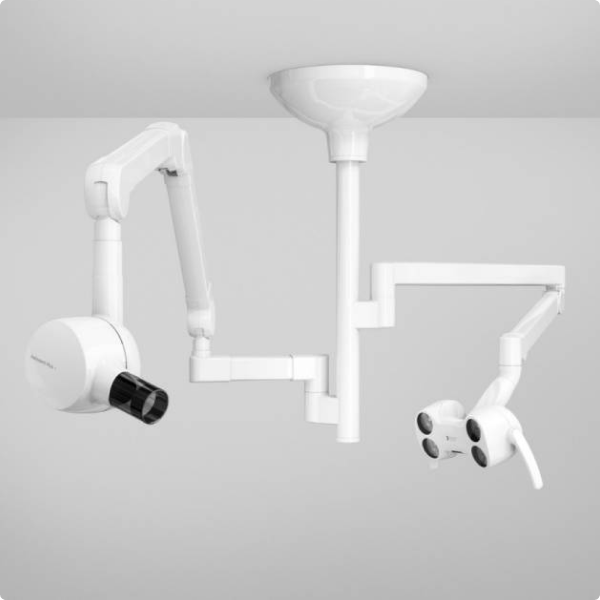
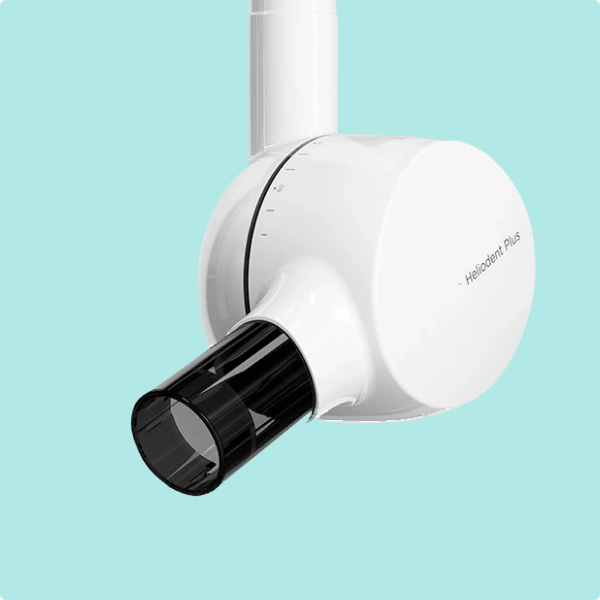
Smart and stable setup for best image quality even at constant usage : Heliodent Plus offers a 0.4mm focal spot and vibration-free components to ideally support your workflow.
Intuitive to use and flexible to fit in your practice : You should not bother about using your intraoral X-ray unit. That is why the control panels are particularly easy-to-use. Moreover, with numerous configurations, it will adapt to the realities of your dental practice.
Install and forget - quality for absolute dependability : Proudly "Made in Germany", the Heliodent Plus counts over 25,000 installations worldwide.
Your gateway to chairside imaging : Make the most out of your space and integrate directly into your treatment center for more efficiency.
- Intraoral x-ray unit
- High contrast images
- Numerous mounting options
- Intuitive and safe operation
- Rectangular collimator
- 0.4mm focal spot


Delivery Included



If you're about to invest in dental equipment, you could be able to combine your costs and benefit from Advance.
Eligible customers will receive a rebate based on their merchandise and clear aligner spend, which can help cover the cost of your equipment.

Henry Schein Advance
If you're about to invest in dental equipment, you could be able to combine your costs and benefit from Advance.
Eligible customers will receive a rebate based on their merchandise and clear aligner spend, which can help cover the cost of your equipment.
Henry Schein Advance
If you're about to invest in dental equipment, you could be able to combine your costs and benefit from Advance.
Eligible customers will receive a rebate based on their merchandise and clear aligner spend, which can help cover the cost of your equipment.

Enquire Now
Ready to buy new equipment? Speak with our equipment specialist today.Will this unit work with digital either sensor or phosphor plate?


Yes, this system will work with all three formats: film, phosphor plates and sensors.
Does this unit have different arm lengths?
Yes, the system has various arm length options to suit your surgery setup.
Is it straight forward to use?
Yes, the system is has simple controls and pre-set exposure times depending on the location of the x-ray in the patients dentition.
Does the installation include a test pack?
Yes, the x-ray will be tested by our engineer after installation.
Cleaning and Care
Cleaning
Remove dirt, grime and disinfectant residue regularly using mild cleaning agents.
During cleaning or disinfection, liquids may enter the manual release button or unit via ventilation slots. Electrical components of the system can be destroyed by liquids.
- Do not spray any liquids into the ventilation slots or manual release button.
- First spray the liquid onto a cleaning cloth. Then wipe the ventilation slots or manual release button with the cleaning cloth.
- Make sure that no liquids run along the surface and into the ventilation slots or the manual release button.
Disinfecting
Only the external surfaces may be disinfected with approved chemical disinfectants. Use only disinfectants that comply with the valid requirements of the respective national regulatory body or whose bactericidal, fungicidal and virucidal properties have been verifiably tested and approved accordingly.
Cleaning and care agents may contain aggressive ingredients. Unsuitable cleaning and care agents are detrimental to health and attack the surface of the unit.
Do not use: Substances containing phenol, peracetic acid, peroxide or any other oxygen-splitting agents, sodium hypochlorite or iodine-splitting agents.
Maintenance
In the interest of the safety and health of patients, users and other persons, inspection and preventive maintenance must be performed at scheduled intervals to ensure the operational reliability and functional safety of your product .
Maintenance of Accessories
With regard to accessories, particularly sensor and film holder systems, please comply with the cleaning and care instructions in the relevant operating instructions.
Annual Inspection
In order to ensure the operational safety and functional reliability of your product, you as the system owner should check the equipment at regular intervals (at least once a year) or call our service team on 0800 028 4749.
Maintenance by the Service Engineer
In addition to the annual check to be carried out by the system owner, preventive maintenance must be performed after 4, 7 and 10 years, and then at two-year intervals.
Image quality check
The image quality should be assessed at regular intervals, at least once a year. On digital image receptor systems, the degree of postprocessing (brightness or contrast adjustment) that is required in the image processing software (e.g. SIDEXIS) to produce satisfactory results is used as an assessment criterion.
Film Image Quality
For conventional X-rays with film processing, the increase of the exposure time is used as an assessment criterion.
Assessment criteria
If, after taking into account the patient's anatomy and excluding possible sources of error such as incorrect patient positioning, this criterion seems to apply, immediately contact our service team on 0800 028 4749 to have potential system faults repaired.
Condensation
Extreme fluctuations of temperature may cause condensation inside the unit. Do not switch the unit on before it has reached normal room temperature. For more information see the Heliodent Plus User Manual.
Introduction
Detailed below is a list of error codes which may appear on your unit. Click on an error code to see what this means and what action should be taken.
Error Codes
Errors during the self-test are indicated by a five-digit number lighting up. The background colour of the display is red.
If an error re-occurs after the unit has been switched off and switched on again, please call our service team on 0800 028 4749.
If you do not find the problem below or the action you take does not solve the problem, please contact our support team on 08700 10 20 46. In order to help you, have the serial number of your unit and a description of the error.
Error Code: E3 04 30
Possible Cause
Release error - the release button may have been pressed during switch on.
Action
Switch the device OFF and then ON again If the error persists, call our service team on 0800 028 4749 and report the error code.
Error Code: E1 11 88
Possible Cause
Display mode ACTIVE - X-ray cannot be release.
Action
Call our service team on 0800 028 4749 and report the error code.
Error Code: E1 04 03
Possible Cause
Internal error.
Action
Press any button to acknowledge the error If the error persists, call our service team on 0800 028 4749 and report the error code.
Error Code: E1 04 04
Possible Cause
Internal error.
Action
Press any button to acknowledge the error If the error persists, call our service team on 0800 028 4749 and report the error code.
Error Code: E1 04 06
Possible Cause
Internal error.
Action
Press any button to acknowledge the error If the error persists, call our service team on 0800 028 4749 and report the error code.
Error Code: E6 04 02
Possible Cause
Internal error.
Action
Press any button to acknowledge the error If the error persists, call our service team on 0800 028 4749 and report the error code.
Error Code: E5 04 50
Possible Cause
Internal error.
Action
Switch the device OFF and then ON again and repeat the exposure If the error persists, call our service team on 0800 028 4749 and report the error code.
Error Code: E6 01 41
Possible Cause
Internal error.
Action
Switch the device OFF and then ON again and repeat the exposure If the error persists, call our service team on 0800 028 4749 and report the error code.
Error Code: E6 01 61
Possible Cause
Internal error.
Action
Switch the device OFF and then ON again and repeat the exposure If the error persists, call our service team on 0800 028 4749 and report the error code.
Error Code: E6 01 62
Possible Cause
Internal error.
Action
Switch the device OFF and then ON again and repeat the exposure If the error persists, call our service team on 0800 028 4749 and report the error code.
Error Code: E6 04 01
Possible Cause
Internal error.
Action
Switch the device OFF and then ON again and repeat the exposure If the error persists, call our service team on 0800 028 4749 and report the error code.
Error Code: E6 04 10
Possible Cause
Internal error.
Action
Switch the device OFF and then ON again and repeat the exposure If the error persists, call our service team on 0800 028 4749 and report the error code.
Error Code: E6 04 11
Possible Cause
Internal error.
Action
Switch the device OFF and then ON again and repeat the exposure If the error persists, call our service team on 0800 028 4749 and report the error code.
Error Code: E6 04 12
Possible Cause
Internal error.
Action
Switch the device OFF and then ON again and repeat the exposure If the error persists, call our service team on 0800 028 4749 and report the error code.
Error Code: E6 04 20
Possible Cause
Internal error.
Action
Switch the device OFF and then ON again and repeat the exposure If the error persists, call our service team on 0800 028 4749 and report the error code.
Error Code: E6 04 21
Possible Cause
Internal error.
Action
Switch the device OFF and then ON again and repeat the exposure If the error persists, call our service team on 0800 028 4749 and report the error code.
Error Code: E6 04 40
Possible Cause
Internal error.
Action
Switch the device OFF and then ON again and repeat the exposure If the error persists, call our service team on 0800 028 4749 and report the error code.
Error Code: E6 04 41
Possible Cause
Internal error.
Action
Switch the device OFF and then ON again and repeat the exposure If the error persists, call our service team on 0800 028 4749 and report the error code.
Error Code: E6 04 42
Possible Cause
Internal error.
Action
Switch the device OFF and then ON again and repeat the exposure If the error persists, call our service team on 0800 028 4749 and report the error code.
Error Code: E7 01 01
Possible Cause
Internal error.
Action
Switch the device OFF and then ON again and repeat the exposure If the error persists, call our service team on 0800 028 4749 and report the error code.
Error Code: E7 01 21
Possible Cause
Internal error.
Action
Switch the device OFF and then ON again and repeat the exposure If the error persists, call our service team on 0800 028 4749 and report the error code.
Error Code: E7 01 51
Possible Cause
Internal error.
Action
Switch the device OFF and then ON again and repeat the exposure If the error persists, call our service team on 0800 028 4749 and report the error code.
Error Code: E5 01 02
Possible Cause
Internal error.
Action
Call our service team on 0800 028 4749 and report the error code.
Error Code: E5 01 12
Possible Cause
Internal error.
Action
Call our service team on 0800 028 4749 and report the error code.
Error Code: E5 01 14
Possible Cause
Internal error.
Action
Call our service team on 0800 028 4749 and report the error code.
Error Code: E5 01 22
Possible Cause
Internal error.
Action
Call our service team on 0800 028 4749 and report the error code.
Error Code: E5 01 32
Possible Cause
Internal error.
Action
Call our service team on 0800 028 4749 and report the error code.
Error Code: E5 01 42
Possible Cause
Internal error.
Action
Call our service team on 0800 028 4749 and report the error code.
Error Code: E6 01 11
Possible Cause
Internal error.
Action
Call our service team on 0800 028 4749 and report the error code.
Error Code: E6 01 13
Possible Cause
Internal error.
Action
Call our service team on 0800 028 4749 and report the error code.
Error Code: E6 01 23
Possible Cause
Internal error.
Action
Call our service team on 0800 028 4749 and report the error code.
Error Code: E6 01 31
Possible Cause
Internal error.
Action
Call our service team on 0800 028 4749 and report the error code.
Error Code: E1 04 51
Possible Cause
Safety circuit - the door switch may not be closed properly.
Action
Switch the device OFF and then ON again, check the door switch If the error persists, call our service team on 0800 028 4749 and report the error code.
Error Code: E3 04 31
Possible Cause
Button error - a button may have been pressed during switch on
Action
Switch the device OFF and then ON again If the error persists, call our service team on 0800 028 4749 and report the error code
Share


Services and Solutions
)
Henry Schein Direct
Streamline your next equipment purchase with Henry Schein Direct, offering fast-track equipment, remote demonstrations, and expert support – wherever you are.

)
Increasing your practice value
By investing in latest technologies, updating your equipment, and increasing your availability with a new surgery room, you can attract new patients, improve the quality of care you offer, and differentiate your practice from competitors.
)
)
Henry Schein Financial Services
A vast range of financial products and services that are offered through our finance partners nationally
)
SunSchein Clearance
SunSchein offers a wide range of ex-showroom and ex-demonstration dental equipment, including treatment centres, laboratory equipment, and digital dentistry equipment.
)
Dental Equipment
Uncover everything you need for your dental practice, from essential dental equipment to cutting-edge solutions.